- Published on
Creating Your Own CocoaPods Pod
Introduction
This is probably the last post before the next intermission. The project needed an image picker control, so I found a Swift project, spent two days porting it to Objective-C, and then decided to publish it as a pod to share with everyone.
Create the Project
First, create a new project on github. Using the current project as an example:
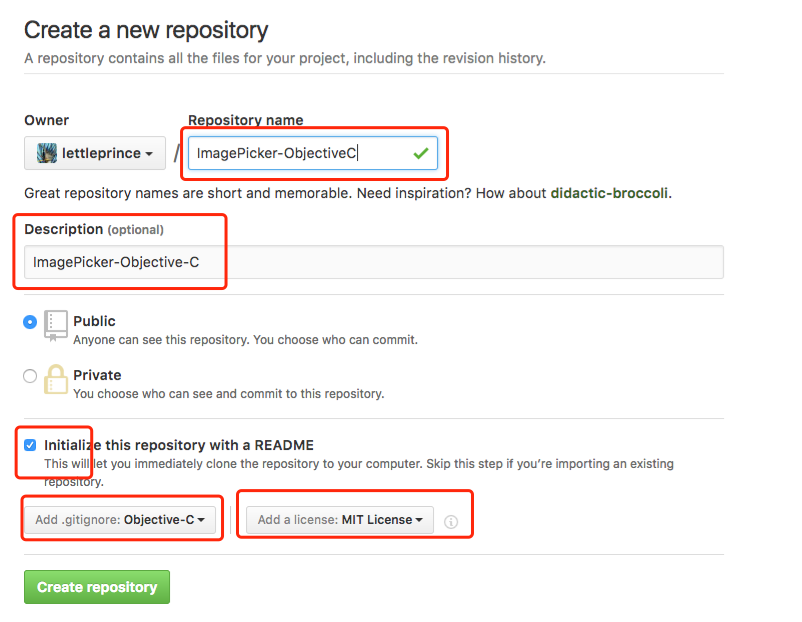
Then clone it locally, add the source code and resources, commit, and push to the master branch. These are all standard git operations — no need to go into detail here.
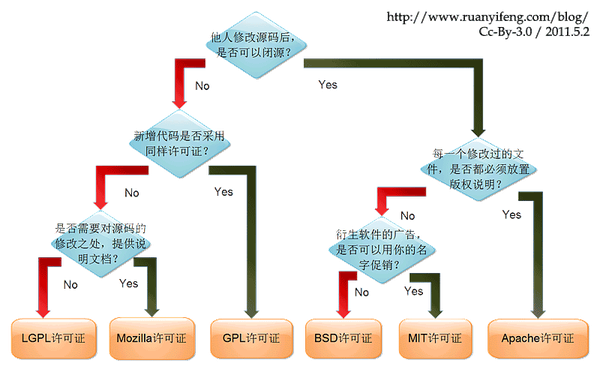
A quick note on open-source licenses — MIT is generally a good choice for most projects:
One important thing to note: publishing a pod requires a tagged version. So you need to create a tag and push it.
# hanxt @ Hanxt in ~/Documents/GitHubWorkspace/ImagePicker-Objective-C on git:master o [16:53:33]
$ git tag 0.0.1

# hanxt @ Hanxt in ~/Documents/GitHubWorkspace/ImagePicker-Objective-C on git:master o [16:53:35]
$ git push --tags
Username for 'https://github.com': tonyh2021
Password for 'https://tonyh2021@github.com':
Total 0 (delta 0), reused 0 (delta 0)
To https://github.com/tonyh2021/ImagePicker-Objective-C.git
 * [new tag]         0.0.1 -> 0.0.1
Preparing Your Pod
First, register with CocoaPods trunk (similar to creating an account):
# hanxt @ Hanxt in ~ [16:16:15]
$ pod trunk register xxx@xxx 'TonyHan'
[!] Please verify the session by clicking the link in the verification email that has been sent to xxx@xxx
Check your email, click the verification link, then confirm in the terminal:
# hanxt @ Hanxt in ~ [16:16:36]
$ pod trunk me
  - Name:     TonyHan
  - Email:    xxx@xxx
  - Since:    September 23rd, 02:16
  - Pods:     None
  - Sessions:
    - September 23rd, 02:16 - January 29th, 2017 02:17.
Create the Podspec File
# hanxt @ Hanxt in ~ [16:17:35]
$ pod spec create ImagePicker-Objective-C

Specification created at ImagePicker-Objective-C.podspec
This file is a Ruby file, and its fields are self-explanatory. A few parameters worth noting:
s.license: The license type used by the pod. Choose the one that matches your project.s.source_files: The path to your source files. Note that this path is relative to the podspec file.s.frameworks: The frameworks your pod depends on. Do not include the.frameworkextension.
You can refer to my file ImagePicker-Objective-C.podspec as an example.
Validating the Pod
Set the version number and tag (I didn't notice any visible changes after running these):
# hanxt @ Hanxt in ~/Documents/GitHubWorkspace/ImagePicker-Objective-C on git:master o [16:56:54]
$ set the new version to 0.0.1

# hanxt @ Hanxt in ~/Documents/GitHubWorkspace/ImagePicker-Objective-C on git:master o [16:56:56]
$ set the new tag to 0.0.1
Run the validation command:
# hanxt @ Hanxt in ~/Documents/GitHubWorkspace/ImagePicker-Objective-C on git:master o [16:57:06]
$ pod lib lint

xcode-select: error: tool 'xcodebuild' requires Xcode, but active developer directory '/Library/Developer/CommandLineTools' is a command line tools instance
 -> ImagePicker-Objective-C (0.0.1)
    - ERROR | license: Sample license type.
    - ERROR | description: The description is empty.
    - ERROR | [iOS] unknown: Encountered an unknown error (The `ImagePicker-Objective-C` pod failed to validate due to 2 errors:
    - ERROR | license: Sample license type.
    - ERROR | description: The description is empty.

) during validation.

[!] ImagePicker-Objective-C did not pass validation, due to 3 errors.
You can use the `--no-clean` option to inspect any issue.
There are errors: the license and description fields need to be fixed. But what about the xcode-select: error: tool 'xcodebuild' requires Xcode error? A Stack Overflow search suggested the tool path was broken. I then remembered I had renamed my Xcode installations to Xcode7 and Xcode8 the day before — that must have broken the command-line tool symlink. Renaming them back to Xcode fixed it, and validation passed.
# hanxt @ Hanxt in ~/Documents/GitHubWorkspace/ImagePicker-Objective-C on git:master x [16:59:21] C:1
$ pod lib lint

 -> ImagePicker-Objective-C (0.0.1)
Demo
Providing a demo for others to reference is always the more polished approach. I pulled in the existing test code, and the project structure looks like this:
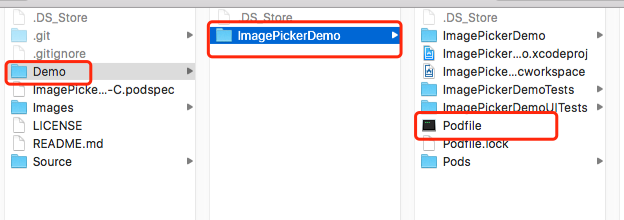
The Podfile:
platform :ios, "8.0"

inhibit_all_warnings!

target "ImagePickerDemo" do
    pod 'ImagePicker-Objective-C', path: '../../'
end
After running pod install, you need to remove the original control source files and use the ones provided by the pod instead. Build and run — no issues.
Resource Handling
Uploading the Podspec File
For a pod to be truly usable, one final step is required: uploading the podspec file to the official CocoaPods Specs repository so it becomes a real pod dependency that others can use.
Fork and clone the Specs repository (this can take a while — I was using the GitHub desktop client).
The convention for storing podspec files in the Specs repository is:
folder named after the pod -> folder named after the version -> podspec file
OK, time to upload...
After half an hour, I decided to try uploading the file directly to GitHub. After looking into it, it seemed there was no way to upload or create directories through the web UI.
Later I found another method: use the pod command directly. It seems you don't need to sync via git every time. Let's try it.
From the project directory:
pod trunk push

[!] Found podspec `ImagePicker-Objective-C.podspec`
[!] You need to register a session first.
I had switched to my home computer, and every new terminal environment requires re-authentication:
# BloodLine @ BloodLineMac in ~/Documents/githubworkspace/ImagePicker-Objective-C on git:master o [11:18:57] C:1
$ pod trunk register xxx@163.com 'Tony Han' --description='macbook pro'

# BloodLine @ BloodLineMac in ~/Documents/githubworkspace/ImagePicker-Objective-C on git:master o [11:20:34]
$ pod trunk me
  - Name:     TonyHan
  - Email:    xxx@163.com
  - Since:    September 23rd, 02:16
  - Pods:     None
  - Sessions:
    - September 23rd, 02:16 - January 29th, 2017 02:17. IP: 211.103.xxx.xxx
    - September 23rd, 21:20 - January 29th, 2017 21:21. IP: 223.72.xxx.xxx
    Description: macbook pro
Authentication done. Now run:
$ pod trunk push --verbose

[!] Found podspec `ImagePicker-Objective-C.podspec`
Updating spec repo `master`
# This took a long time...
  - Data URL: https://raw.githubusercontent.com/CocoaPods/Specs/201be904f9c457f2d69ed84359151b6e0063e249/Specs/ImagePicker-Objective-C/0.0.1/ImagePicker-Objective-C.podspec.json
  - Log messages:
    - September 23rd, 22:07: Push for `ImagePicker-Objective-C 0.0.1' initiated.
    - September 23rd, 22:07: Push for `ImagePicker-Objective-C 0.0.1' has been pushed
    (0.416402311 s).
References
CocoaPods In Depth — Creating a Pod
How to Publish Your Open-Source Framework to CocoaPods
Code
All the code in this article can be found on my GitHub ImagePicker-Objective-C.