- Published on
Design Patterns in iOS — Prototype
Introduction
I used to lead a small iOS team, spending my days dealing with endless inter-team friction while also serving as the lead developer writing code. It was high-pressure, low-reward work. Recently I moved to a new environment (not a top-tier team, but still) and finally have the mental space to dig into the details. In fact, the team's high standards for code quality and architectural design push me to approach my work from a higher and deeper perspective.
The design patterns rabbit hole is going to take at least ten to twenty posts to cover.
Prototype Pattern
Prototype Pattern: Specifies the kind of objects to create using a prototype instance, and creates new objects by copying that prototype. In plain terms: in Objective-C, you can use deep copying to quickly and conveniently create new objects.
Class Diagram
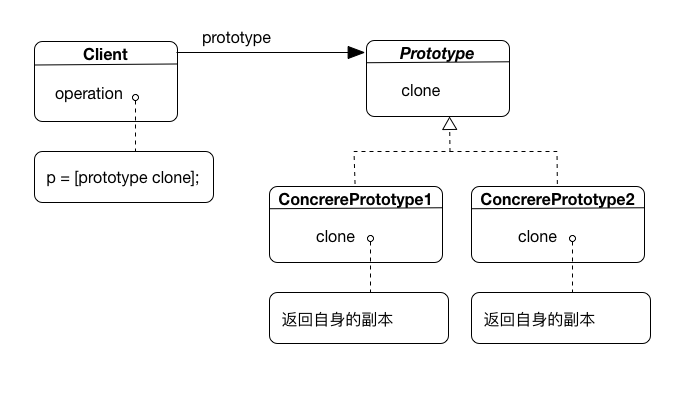
Prototype declares the interface for cloning itself. ConcretePrototype, as a concrete implementation of Prototype, implements the clone operation. The client here refers to a class that uses an instance of the prototype. The client creates a new object — a copy of the prototype — via clone.
When to Use It
-
The object to be created should be independent of its type and creation process. That is, the object cannot be created simply by calling an initializer; the creation process is complex or non-generic.
-
The class to be instantiated is determined at runtime. At the time of writing, you don't know which object will be created or what its internal structure looks like (e.g., the complexity depends on user actions).
-
You want to avoid a factory hierarchy that mirrors the product hierarchy. Rather than controlling object creation through factory methods or abstract factories, you want to clone objects directly.
-
Differences between instances of different classes are only a matter of state combinations. Copying an appropriate number of prototypes is more convenient than manually instantiating them.
-
A class is hard to create — for example, a composite object where each component can have other components as children. Cloning an existing composite object and modifying the copy is easier. The internal structure is complex and difficult to reproduce from scratch.
Two common use cases:
-
You have many related classes that behave similarly but differ mainly in internal properties such as names or images.
-
You need a composite (tree-structured) object as the basis for something else — for example, using a composite object as a component to build another composite object.
In short: when creating an object via initializers is cumbersome or even impossible, consider using the Prototype pattern to deep-copy a model as a starting point.
How to Use It
Example code:
@interface Person : NSObject
@property (nonatomic, copy) NSString *name;
@property (nonatomic, assign) int age;
@end

@implementation Person
- (id)copyWithZone:(NSZone *)zone {
    Person *p = [[[self class] allocWithZone:zone] init];
    p.name = self.name;//copy all properties
    p.age = self.age;
    return p;
}
@end

Person *p1 = [[Person alloc] init];
p1.name = @"name1";
p1.age = 29;

Person *p2 = [p1 copy];

NSLog(@"%@:%@, %d", p1, p1.name, p1.age);
NSLog(@"%@:%@, %d", p2, p2.name, p2.age);
2016-09-05 18:31:19.677 OCDemo[3532:462200] <Person: 0x7fadd94930d0>:name1, 29
2016-09-05 18:31:19.678 OCDemo[3532:462200] <Person: 0x7fadd9495750>:name1, 29
Personinherits fromNSObject(which implementscopy). When aPersoninstance receives acopymessage,NSObjectforwards the message to subclasses that implement theNSCopyingprotocol. SoPersonmust implement- (id)copyWithZone:(NSZone *)zone, otherwise it will error.
copyis just shorthand forcopyWithZone:using the default zone. It's rare to callcopyWithZone:directly; defining and implementing it is required to conform to@protocol NSCopying. So you would normally only seecopyWithZone:inside the implementation ofcopyWithZone:. Similarly, you would typically avoid overridingcopy, and let the default implementation call through tocopyWithZone:. What is the difference between "-copy" and "-copyWithZone:"? — In short: implementcopyWithZone:, callcopy.
- Using
[self class]allows subclasses to use this method as well. However, be careful when a subclass has additional properties.
@interface Student : Person
@property (nonatomic, assign) int age;
@property (nonatomic, copy) NSString *address;
@property (nonatomic, assign) CGSize size;
@end

@implementation Student
@end

Student *s1 = [[Student alloc] init];
s1.name = @"s1";
s1.age = 15;
s1.address = @"Beijing";
s1.size = CGSizeMake(175, 65);

Student *s2 = [s1 copy];

NSLog(@"%@:%@, %d, %@, %@", s1, s1.name, s1.age, s1.address, NSStringFromCGSize(s1.size));
NSLog(@"%@:%@, %d, %@, %@", s2, s2.name, s2.age, s2.address, NSStringFromCGSize(s2.size));
2016-09-05 17:56:24.539 OCDemo[3436:446050] <Student: 0x7fda69c60e40>:s1, 15, Beijing, {175, 70}
2016-09-05 17:56:27.307 OCDemo[3436:446050] <Student: 0x7fda6c054aa0>:s1, 15, (null), {0, 0}
Studentuses its parent classPerson'scopyWithZoneimplementation, but sinceaddresswas never assigned in that method, the copied instance hasaddressasnull.
- (id)copyWithZone:(NSZone *)zone {
    Student *s = [[[self class] allocWithZone:zone] init];
    s.name = self.name;
    s.age = self.age;
    s.address = self.address;
    s.size = self.size;
    return s;
}
Should Student override copyWithZone and manually reassign all properties? That's not elegant. Here's a more framework-level approach:
@interface BaseCopyObject : NSObject <NSCopying>
- (void)copyOperationWithObject:(id)object;
@end

@implementation BaseCopyObject
//Subclasses should not override this method
- (id)copyWithZone:(NSZone *)zone {
    BaseCopyObject *object = [[[self class] allocWithZone:zone] init];
    [self copyOperationWithObject:object];//perform property assignment
    return object;
}
//Subclasses implement this method to perform property assignment
- (void)copyOperationWithObject:(id)object {}
@end

@interface Person : BaseCopyObject
@property (nonatomic, copy) NSString *name;
@property (nonatomic, assign) int age;
@end

@implementation Person
- (void)copyOperationWithObject:(Person *)object {
    object.name = self.name;
    object.age = self.age;
}
@end

@interface Student : Person
@property (nonatomic, copy) NSString *address;
@property (nonatomic, assign) CGSize size;
@end

@implementation Student
- (void)copyOperationWithObject:(Student *)object {
    [super copyOperationWithObject:object];//copy parent class properties
    object.address = self.address;
    object.size = self.size;
}
@end
Pay attention to properties of complex types such as Person or NSArray:
@interface Student : Person
@property (nonatomic, copy) NSString *address;
@property (nonatomic, assign) CGSize size;
@property (nonatomic, strong) Person *teacher;//Note: Person is a subclass of BaseCopyObject
@property (nonatomic, copy) NSArray *friends;
@property (nonatomic, strong) NSMutableArray *girlfriends;//the more the merrier
@end

@implementation Student
- (void)copyOperationWithObject:(Student *)object {
    [super copyOperationWithObject:object];
    object.size = self.size;
    object.teacher = [self.teacher copy];
    object.address = self.address;
    object.friends = self.friends;
//  object.friends = [self.friends copy];
//  Neither of these achieves a "true" copy
    object.girlfriends = [self.girlfriends mutableCopy];
}
@end
2016-09-05 19:35:34.012 OCDemo[3852:525566] <Student: 0x7ffe78e2e7e0>:s1, 15, Beijing, {175, 65}, <Person: 0x7ffe7b035db0>, (
    "<Student: 0x7ffe78e2e910>",
    "<Student: 0x7ffe78e2e960>"
), (
    "<Student: 0x7ffe78e40b10>",
    "<Student: 0x7ffe78e40b60>",
    "<Student: 0x7ffe78e40bb0>"
)
2016-09-05 19:35:34.012 OCDemo[3852:525566] <Student: 0x7ffe7b0365c0>:s1, 15, Beijing, {175, 65}, <Person: 0x7ffe7b036610>, (
    "<Student: 0x7ffe78e2e910>",
    "<Student: 0x7ffe78e2e960>"
), (
    "<Student: 0x7ffe78e40b10>",
    "<Student: 0x7ffe78e40b60>",
    "<Student: 0x7ffe78e40bb0>"
)
The teacher property was properly copied, but unfortunately the elements inside friends and girlfriends were not. Nobody wants to share their girlfriend with someone else. The correct implementation:
@implementation Student
- (void)copyOperationWithObject:(Student *)object {
    [super copyOperationWithObject:object];
    object.size = self.size;
    object.teacher = [self.teacher copy];
    object.address = self.address;
    object.friends = [[NSArray alloc] initWithArray:self.friends copyItems:YES];
    object.girlfriends = [[NSMutableArray alloc] initWithArray:self.girlfriends copyItems:YES];
}
@end
2016-09-05 19:41:11.919 OCDemo[3867:531529] <Student: 0x7fa4eb48c400>:s1, 15, Beijing, {175, 65}, <Person: 0x7fa4eb5377f0>, (
    "<Student: 0x7fa4eb48bea0>",
    "<Student: 0x7fa4eb48bef0>"
), (
    "<Student: 0x7fa4eb48bf60>",
    "<Student: 0x7fa4eb48bfb0>",
    "<Student: 0x7fa4eb48cf80>"
)
2016-09-05 19:41:11.919 OCDemo[3867:531529] <Student: 0x7fa4eb72b240>:s1, 15, Beijing, {175, 65}, <Person: 0x7fa4eb72aba0>, (
    "<Student: 0x7fa4eb72b290>",
    "<Student: 0x7fa4eb72b310>"
), (
    "<Student: 0x7fa4eb72b390>",
    "<Student: 0x7fa4eb72b410>",
    "<Student: 0x7fa4eb72b8b0>"
)
That's more like it.
Now consider: Student has another property others that stores two nested arrays — a two-dimensional array. Using object.others = [[NSArray alloc] initWithArray:self.others copyItems:YES]; still doesn't achieve a "true" copy of the nested elements.
In that case, use:
object.others = [NSKeyedUnarchiver unarchiveObjectWithData:
                     [NSKeyedArchiver archivedDataWithRootObject:self.others]];
2016-09-05 20:20:31.745 OCDemo[4160:573360] <Student: 0x7f96a8548d60>:s1, 15, Beijing, {175, 65}, <Person: 0x7f96a8548ae0>, (
    "<Student: 0x7f96a8548ed0>",
    "<Student: 0x7f96a8548f20>"
), (
    "<Student: 0x7f96a8548f70>",
    "<Student: 0x7f96a8548fc0>",
    "<Student: 0x7f96a8549010>"
), (
        (
        "<Student: 0x7f96a8549240>",
        "<Student: 0x7f96a8549290>"
    ),
        (
        "<Student: 0x7f96a8549300>",
        "<Student: 0x7f96a8549350>",
        "<Student: 0x7f96a85493a0>"
    )
)
2016-09-05 20:20:31.745 OCDemo[4160:573360] <Student: 0x7f96a84d40c0>:s1, 15, Beijing, {175, 65}, <Person: 0x7f96a8413d20>, (
    "<Student: 0x7f96a84d3f80>",
    "<Student: 0x7f96a84d4d10>"
), (
    "<Student: 0x7f96a84d5430>",
    "<Student: 0x7f96a84d5b60>",
    "<Student: 0x7f96a84d6280>"
), (
        (
        "<Student: 0x7f96a854b900>",
        "<Student: 0x7f96a854d1b0>"
    ),
        (
        "<Student: 0x7f96a854d520>",
        "<Student: 0x7f96a854d740>",
        "<Student: 0x7f96a854d940>"
    )
)
Note that since the array elements are Student instances, Student needs to implement the <NSCoding> protocol methods. Alternatively, third-party frameworks like MJExtension or YYModel can handle this quickly.
I've gone a bit far down the rabbit hole.
Prototype Pattern in Cocoa
Beyond the various copy methods discussed above, there's actually another classic example of the Prototype pattern in Cocoa: Zombie Objects (NSZombie Object). Although what's being copied here is a class object rather than an instance, since classes in Objective-C are also special objects, understanding this through the lens of the Prototype pattern is reasonable. See Using Zombie Objects to Aid Debugging for details.
References
Deep Copy vs. Shallow Copy in iOS
Code
All code in this article can be found in my GitHub repository DesignPatterns.