- Published on
Getting Started with the JavaScriptCore Framework
Introduction
My recent project involves Hybrid development, requiring interaction between JavaScript and Objective-C code. Since the JS interface was already in use on the Android side and couldn't be easily changed, I explored several approaches and ultimately chose the JavaScriptCore framework.
The JavaScriptCore framework is essentially just a wrapper around the C/C++ implementation inside webkit.
Classes in JavaScriptCore
<JavaScriptCore/JavaScriptCore.h> imports 5 files, each defining a class corresponding to its filename:
#ifndef JavaScriptCore_h
#define JavaScriptCore_h

#include <JavaScriptCore/JavaScript.h>
#include <JavaScriptCore/JSStringRefCF.h>

#if defined(__OBJC__) && JSC_OBJC_API_ENABLED

#import "JSContext.h"
#import "JSValue.h"
#import "JSManagedValue.h"
#import "JSVirtualMachine.h"
#import "JSExport.h"

#endif

#endif /* JavaScriptCore_h */
JSContext and JSValue
JSVirtualMachine provides the underlying resources for JavaScript execution. JSContext provides the execution environment; you can run a JavaScript script via - (JSValue *)evaluateScript:(NSString *)script, and any functions, variables, etc. defined in the script will be stored in the context for later use. Every JSContext is created based on a JSVirtualMachine — using - (id)initWithVirtualMachine:(JSVirtualMachine *)virtualMachine. If you initialize using - (id)init, a new JSVirtualMachine object is automatically created internally before calling the former initializer.
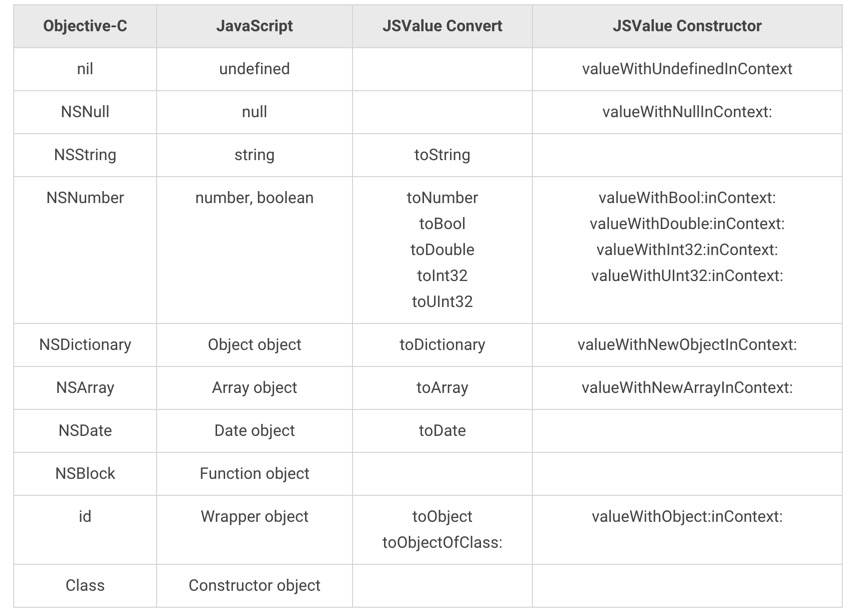
JSValue acts as the bridge for data conversion between JavaScript and Objective-C, providing a variety of methods to conveniently convert JavaScript data types to Objective-C and back. The type mapping is as follows:
Basic Type Conversion
Let's start with a simple example:
- (void)jsTest {
    JSContext *context = [[JSContext alloc] init];
    JSValue *jsValue = [context evaluateScript:@"15 + 7"];
    int intVal = [jsValue toInt32];
    NSLog(@"JSValue: %@, int: %d", jsValue, intVal);
}
Output:
2016-02-25 14:54:54.899 JavaScriptCoreDemo[39256:5538866] JSValue: 22, int: 22
You can also store a JavaScript variable in a JSContext and retrieve it using subscript notation. For Array or Object types, JSValue can also directly get and set values using subscripts.
- (void)jsTest2 {
    JSContext *context = [[JSContext alloc] init];
    [context evaluateScript:@"var arr = [15, 7 , 'www.ibloodline.com'];"];
    JSValue *jsValueArray = context[@"arr"]; // Get array from JSContext

    NSLog(@"jsValueArray: %@;    length: %@", jsValueArray, jsValueArray[@"length"]);
    jsValueArray[1] = @"blog"; // Use JSValue as array
    jsValueArray[7] = @7;

    NSLog(@"jsValueArray: %@;    length: %d", jsValueArray, [jsValueArray[@"length"] toInt32]);

    NSArray *nsArray = [jsValueArray toArray];
    NSLog(@"NSArray: %@", nsArray);
}
Output:
2016-02-25 14:55:20.411 JavaScriptCoreDemo[39264:5539214] jsValueArray: 15,7,www.ibloodline.com;    length: 3
2016-02-25 14:55:20.412 JavaScriptCoreDemo[39264:5539214] jsValueArray: 15,blog,www.ibloodline.com,,,,,7;    length: 8
2016-02-25 14:55:20.412 JavaScriptCoreDemo[39264:5539214] NSArray: (
    15,
    blog,
    "www.ibloodline.com",
    "<null>",
    "<null>",
    "<null>",
    "<null>",
    7
)
The output clearly shows that the code successfully assigned data from Objective-C to the JavaScript array. JSValue follows JavaScript array behavior: no out-of-bounds errors, with the array automatically expanding. You can also access properties of JavaScript objects through JSValue — for example, length retrieves the JavaScript array's length. When converted to NSArray, all information is correctly transferred.
Method Conversion
Not only can various data types be converted, but Objective-C Blocks can also be passed into a JSContext to serve as JavaScript functions. For example, the log method commonly used in front-end development — while JavaScriptCore doesn't include it natively (since it's not running in a browser, there's no window, document, or console) — you can still define a Block to call NSLog to simulate it:
- (void)jsTest3 {
    JSContext *context = [[JSContext alloc] init];
    context[@"log"] = ^() {
        NSLog(@"---Begin Log---");

        NSArray *args = [JSContext currentArguments];
        for (JSValue *jsVal in args) {
            NSLog(@"%@", jsVal);
        }

        JSValue *this = [JSContext currentThis];
        NSLog(@"this: %@",this);
        NSLog(@"---End Log---");
    };

    [context evaluateScript:@"log('ibloodline', [15, 7], { hello:'javascript', js:100 });"];
}
This is quite handy for debugging. Output:
2016-02-25 14:57:34.779 JavaScriptCoreDemo[39274:5540070] ---Begin Log---
2016-02-25 14:57:34.779 JavaScriptCoreDemo[39274:5540070] ibloodline
2016-02-25 14:57:34.779 JavaScriptCoreDemo[39274:5540070] 15,7
2016-02-25 14:57:34.780 JavaScriptCoreDemo[39274:5540070] [object Object]
2016-02-25 14:57:34.781 JavaScriptCoreDemo[39274:5540070] this: [object GlobalObject]
2016-02-25 14:57:34.781 JavaScriptCoreDemo[39274:5540070] ---End Log---
The Block successfully bridged a JavaScript method call back into Objective-C while still following all the characteristics of JavaScript functions, such as a variable number of arguments. That's why JSContext provides class methods to get the argument list (+ (NSArray *)currentArguments) and the current calling object (+ (JSValue *)currentThis). In the example above, this outputs GlobalObject, which is also what the JSContext instance method - (JSValue *)globalObject; returns. In JavaScript, all global variables and functions are properties of a global object — in a browser that's window; what it is in JavaScriptCore is left as an exercise for the reader.
A Block can be passed into a JSContext as a method, but JSValue has no toBlock method to convert a JavaScript function into a Block for use in Objective-C — since a Block's parameter count, types, and return type are fixed. Although you can't extract a function as a Block, JSValue provides - (JSValue *)callWithArguments:(NSArray *)arguments; to call the function by passing arguments to it.
- (void)jsTest4 {
    JSContext *context = [[JSContext alloc] init];
    [context evaluateScript:@"function add(a, b) { return a + b; }"];
    JSValue *add = context[@"add"];
    NSLog(@"JSValue add:  %@", add);

    JSValue *sum = [add callWithArguments:@[@(15), @(7)]];
    NSLog(@"JSValue sum:  %d",[sum toInt32]);
}
Output:
2016-02-25 15:13:29.550 JavaScriptCoreDemo[39313:5544634] JSValue add:  function add(a, b) { return a + b; }
2016-02-25 15:13:29.551 JavaScriptCoreDemo[39313:5544634] JSValue sum:  22
JSValue also provides - (JSValue *)invokeMethod:(NSString *)method withArguments:(NSArray *)arguments; so you can directly call a method on an object. If the method is a global function, you should call it on the JSContext's globalObject; if it's a method on a JavaScript object, call it on the corresponding JSValue object.
Exception Handling
Objective-C exceptions are caught by Xcode at runtime, but JavaScript exceptions that occur within a JSContext are only captured and stored in the context's exception property — they are not thrown outward. Constantly checking whether exception is nil is impractical. A better approach is to set an exceptionHandler on the JSContext, which accepts a block of the form ^(JSContext *context, JSValue *exceptionValue). The default implementation simply assigns the incoming exceptionValue to the incoming context's exception property:
^(JSContext *context, JSValue *exceptionValue) {
    context.exception = exceptionValue;
};
You can assign a new block to exceptionHandler so that you're immediately notified when a JavaScript exception occurs:
- (void)jsTest5 {
    JSContext *context = [[JSContext alloc] init];
    context.exceptionHandler = ^(JSContext *con, JSValue *exception) {
        NSLog(@"%@", exception);
        con.exception = exception;
    };

    [context evaluateScript:@"ibloodline.age = 897"];
}
Output:
2016-02-25 15:17:45.635 JavaScriptCoreDemo[39340:5546141] JSValue exception:ReferenceError: Can't find variable: ibloodline
Notes on Using Blocks
From the examples above, you can see how powerful Blocks are in JavaScriptCore — they build more bridges between JavaScript and Objective-C, making interoperability more convenient. However, note that whether you pass a Block to a JSContext to make it a JavaScript function, or assign it to the exceptionHandler property, never directly reference an externally defined JSContext or JSValue object inside the Block. Instead, pass them as parameters into the Block, or use the class method + (JSContext *)currentContext; to get the current context. Failing to do so will cause circular references that prevent memory from being properly released.
For example, in the custom exception handler above, the Block assigns to the passed-in JSContext parameter con, not the externally created context object — even though they refer to the same object. This is because a Block strongly retains any externally defined objects it captures, and JSContext also strongly retains any Block assigned to it, creating a circular reference (Circular Reference) that prevents memory from being properly freed.
Similarly, you cannot reference a JSValue directly inside a Block from the outside, because every JSValue holds a reference to its JSContext (@property(readonly, retain) JSContext *context;), and that JSContext also retains the Block, again forming a retain cycle.
Key-Value Programming — Dictionary
JSContext cannot directly convert Objective-C and JavaScript objects, since the two object-oriented approaches differ: the former is class-based, the latter prototype-based. However, all objects can be treated as a collection of key-value pairs, so JavaScript objects can be returned to Objective-C and accessed as NSDictionary types.
- (void)jsTest6 {

    JSContext *context = [[JSContext alloc] init];
    context.exceptionHandler = ^(JSContext *con, JSValue *exception) {
        NSLog(@"JSValue exception: %@", exception);
        con.exception = exception;
    };

    context[@"log"] = ^() {
        NSArray *args = [JSContext currentArguments];
        for (id obj in args) {
            NSLog(@"js log: %@", obj);
        }
    };

    JSValue *obj =[context evaluateScript:@"var jsObj = { age:897, name:'ibloodline' }; log(jsObj.age); jsObj"];
    NSLog(@"JSValue obj: %@, %@", obj[@"age"], obj[@"name"]);

    NSDictionary *dic = [obj toDictionary];
    NSLog(@"NSDictionary dic: %@, %@", dic[@"age"], dic[@"name"]);
}
2016-02-25 15:38:37.879 JavaScriptCoreDemo[39480:5554190] ---js log: ---
2016-02-25 15:38:37.880 JavaScriptCoreDemo[39480:5554190] 897
2016-02-25 15:38:37.880 JavaScriptCoreDemo[39480:5554190] ---js log end: ---
2016-02-25 15:38:37.880 JavaScriptCoreDemo[39480:5554190] JSValue obj: 897, ibloodline
2016-02-25 15:38:37.880 JavaScriptCoreDemo[39480:5554190] NSDictionary dic: 897, ibloodline
Similarly, NSDictionary and NSMutableDictionary passed into a JSContext can be accessed directly as objects:
- (void)jsTest7 {
    JSContext *context = [[JSContext alloc] init];
    context.exceptionHandler = ^(JSContext *con, JSValue *exception) {
        NSLog(@"JSValue exception: %@", exception);
        con.exception = exception;
    };

    context[@"log"] = ^() {
        NSArray *args = [JSContext currentArguments];
        for (id obj in args) {
            NSLog(@"---js log begin: ---");
            NSLog(@"%@", obj);
            NSLog(@"---js log end: ---");
        }
    };

    NSDictionary *dic = @{@"name": @"ibloodline", @"#":@(897)};
    context[@"dic"] = dic;
    [context evaluateScript:@"log(dic.name, dic['#'])"];
}
2016-02-25 15:38:56.589 JavaScriptCoreDemo[39487:5554432] ---js log begin: ---
2016-02-25 15:38:56.589 JavaScriptCoreDemo[39487:5554432] ibloodline
2016-02-25 15:38:56.589 JavaScriptCoreDemo[39487:5554432] ---js log end: ---
2016-02-25 15:38:56.589 JavaScriptCoreDemo[39487:5554432] ---js log begin: ---
2016-02-25 15:38:56.590 JavaScriptCoreDemo[39487:5554432] 897
2016-02-25 15:38:56.590 JavaScriptCoreDemo[39487:5554432] ---js log end: ---
Code:
All code from this post can be found on my GitHub JavaScriptCoreDemo.